When you publish a port in Docker, it automatically modifies iptables to bypass your UFW firewall rules. This guide explains why this bypass occurs (the FORWARD chain vs. INPUT chain routing) and details three practical ways to secure your containerized services.
The Firewall Stack
To understand the bypass, here is a quick look at the Linux firewall layers:
- Kernel Engine (Netfilter): The packet filtering and routing engine built into the Linux kernel.
- Low-Level Interfaces (iptables & nftables): Command-line tools used to configure Netfilter. On modern distributions,
iptablesis a symlink (iptables-nft) translating commands to nativenftablesrules. - High-Level Wrapper (UFW): “Uncomplicated Firewall” is a Python wrapper that translates friendly commands (e.g.,
ufw allow 80) into low-level rules.
Why Docker Bypasses UFW
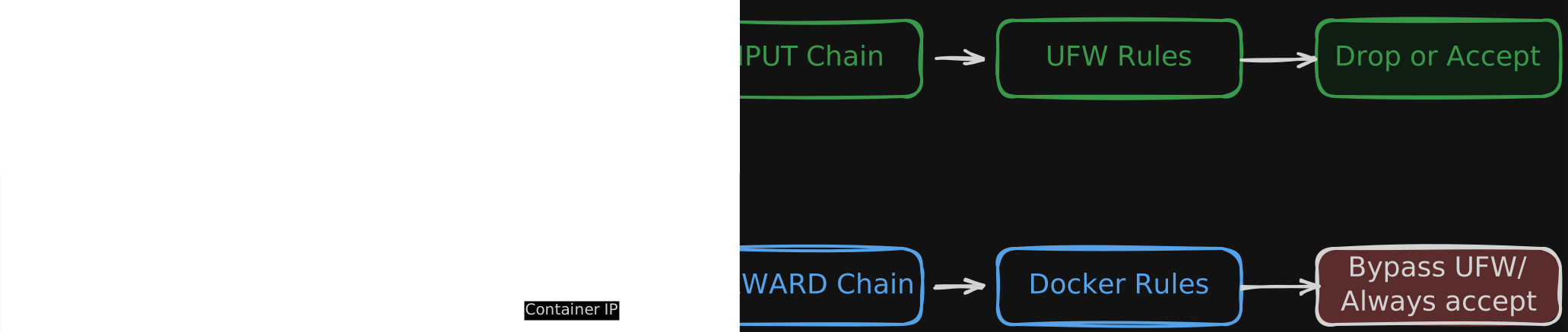
UFW places its filtering rules inside the INPUT chain of the filter table. This chain only handles traffic destined for processes running on the host OS itself.
When you publish a port with -p or ports:, Docker does two things:
- Translates the destination IP via DNAT in the
PREROUTINGchain. - Inserts rules in the
FORWARDchain of thefiltertable to route traffic to the container.
Because the packet is destined for the container (which has its own IP like 172.18.0.2), it goes through the FORWARD chain. Docker inserts its rules at the top of this chain, bypassing UFW’s INPUT rules entirely.
Technical Solutions
Choose one of these approaches depending on your requirements.
Bind to Localhost or VPN IP (Recommended)
If a service does not need public internet access, explicitly declare the interface IP in your port mapping.
Docker Compose Example:
|
|
Configure before.rules for Native UFW Integration
If you must publish ports to 0.0.0.0 but want UFW to control access, you can intercept traffic in Docker’s DOCKER-USER chain. UFW allows defining raw iptables rules inside its configurations.
-
IPv4 Rules (
/etc/ufw/before.rules): Append this block at the very end of the file (after the lastCOMMITline):1 2 3 4 5 6 7 8 9 10 11 12 13 14 15 16 17 18 19# --- Docker Custom Filtering --- *filter :DOCKER-USER - [0:0] # Allow established/related traffic -A DOCKER-USER -m conntrack --ctstate RELATED,ESTABLISHED -j ACCEPT # Allow VPN interfaces (e.g. wg0 or tailscale0) -A DOCKER-USER -i wg0 -j ACCEPT -A DOCKER-USER -i tailscale0 -j ACCEPT # Optional: Allow public web traffic using originally requested port -A DOCKER-USER -i enp0s6 -p tcp -m conntrack --ctorigdstport 80 -j ACCEPT -A DOCKER-USER -i enp0s6 -p tcp -m conntrack --ctorigdstport 443 -j ACCEPT # Drop all other traffic from the public interface (e.g. enp0s6) -A DOCKER-USER -i enp0s6 -j DROP COMMIT(Replace
enp0s6with your server’s public network interface name).ip addrcan help you find the correct interface. -
IPv6 Rules (
/etc/ufw/before6.rules): Append the same block to the end of the IPv6 rules file to protect against IPv6 bypasses. -
Reload UFW:
1sudo ufw reload
Switch to Native nftables
If you want to move away from UFW or legacy iptables and configure your firewall natively, nftables is the modern Linux standard.
-
Install nftables:
1sudo apt update && sudo apt install -y nftables -
Configure your ruleset (
/etc/nftables.conf): Unlike UFW,nftablesallows you to define rules in a single structured configuration. Open/etc/nftables.confand populate it with a clean template that protects container forward paths:1 2 3 4 5 6 7 8 9 10 11 12 13 14 15 16 17 18 19 20 21 22 23 24 25 26 27 28 29 30 31 32 33 34table inet filter { chain input { type filter hook input priority filter; policy drop; # Allow loopback interface iifname "lo" accept # Allow established/related traffic ct state established,related accept # Allow SSH (Port 22) tcp dport 22 accept # Allow Tailscale and Wireguard VPNs iifname "tailscale0" accept iifname "wg0" accept } chain forward { type filter hook forward priority filter; policy drop; # Allow established/related traffic ct state established,related accept # Allow outgoing traffic from containers (also handles bridge-to-bridge communication) iifname { "docker0", "br-*" } accept # Allow Tailscale & Wireguard VPNs to access containers iifname { "tailscale0", "wg0" } oifname { "docker0", "br-*" } accept # Allow public web traffic (HTTP/HTTPS) using original destination ports iifname "enp0s6" oifname { "docker0", "br-*" } ct original proto-dst { 80, 443 } accept } }(Ensure you replace
enp0s6,tailscale0, orwg0with your actual network interfaces). -
Start and enable the service:
1
2
sudo systemctl enable nftables sudo systemctl start nftablesYou can validate the configuration syntax using
sudo nft -c -f /etc/nftables.confand apply changes by runningsudo systemctl reload nftables.
Summary
| Fix Method | Effort | Security | Notes |
|---|---|---|---|
| Localhost/VPN Bind | Low | High | Best when containers only serve local/internal proxies. |
DOCKER-USER in UFW |
Medium | High | Safest method to manage custom rules directly via UFW templates. |
Native nftables |
High | High | Best for modern Linux systems; bypasses UFW/iptables entirely for clean, unified rules. |

